

Adobe Ushers in a New Era of Creativity with New Creative Agent and Generative AI Innovations in Adobe Firefly
- Written by: Times Media
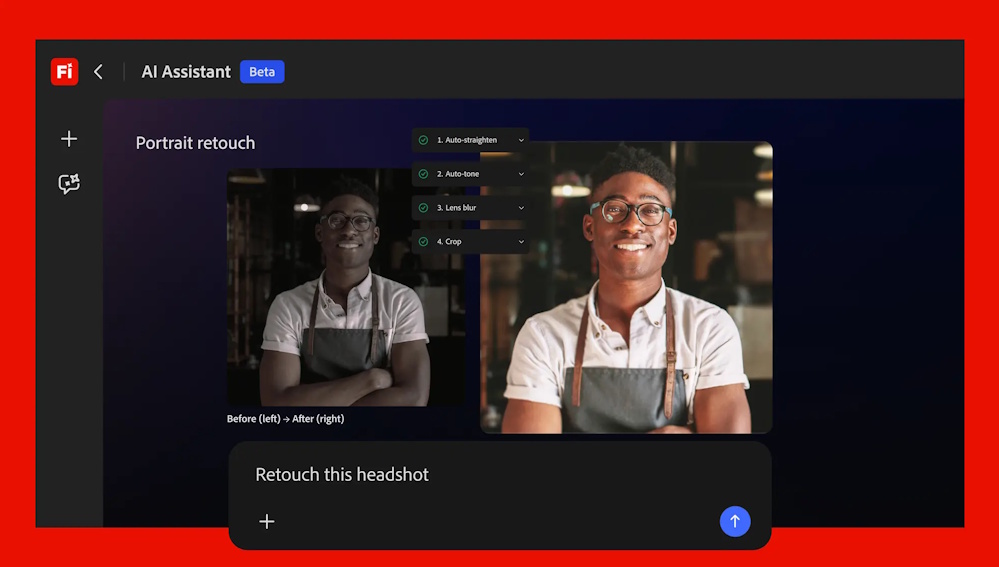
Adobe (Nasdaq: ADBE) — the global technology leader that unleashes creativity, productivity and customer experiences through innovative tools and platforms — unveiled Firefly AI Assistant, powered by Adobe’s creative agent, that brings the power of Adobe’s creative tools into a single conversational interface. Available soon in Adobe Firefly, the all-in-one creative AI studio, Firefly AI Assistant enables creators to describe the outcome they want using their own words as the assistant orchestrates and executes complex, multi-step workflows across Adobe’s Creative Cloud apps, including Firefly, Photoshop, Premiere, Lightroom, Express, Illustrator and more.
This marks a fundamental shift in how creative work is done, allowing creators to direct the assistant to achieve the outcomes they want, saving time and effort while collapsing the distance between what they imagine and what they can create. Adobe’s approach to agentic creativity puts creators in control: they provide the vision, judgment, and creative direction, while the assistant handles the orchestration and execution. Firefly AI Assistant builds on Adobe’s investment in assistive, conversational and generative AI, extending that foundation to power a new era of agentic creativity.
"Adobe is leading the shift into a new era of agentic creativity, where you direct how your work takes shape and your perspective, voice and taste become the most powerful creative instruments of all," said David Wadhwani, President, Creativity & Productivity Business, Adobe. “Adobe Firefly is a category of one, with the best models, the most powerful tools and now, a fundamentally new way of creating that gives you the combined power and precision of all our creative apps in one place.”
Adobe also significantly expanded Firefly's video and image editing capabilities, introducing new features in Firefly Video Editor including studio-quality sound, advanced color adjustments and Adobe Stock integration, as well as new precision image editing capabilities such as Precision Flow and AI Markup. Firefly’s roster of more than 30 top industry AI models now includes Kling 3.0 and Kling 3.0 Omni, joining Google’s Nano Banana 2 and Veo 3.1, Runway’s Gen-4.5, ElevenLabs’ Multilingual v2 and more, to offer creators unmatched choice and flexibility in how they create.
Together, these innovations cement Firefly as the definitive all-in-one creative AI studio, giving every creator the speed, control and creative freedom to move from idea to high-quality content.
Firefly AI Assistant: A New Way to Create Across Adobe’s Apps
Firefly AI Assistant lets creators simply describe the outcome they want, then orchestrates and executes complex, multi-step workflows across Adobe Photoshop, Firefly, Premiere, Express, Lightroom, Illustrator and more, all within a single, unified conversational interface. For creators of all levels, this shift to agentic creation simplifies the process of getting started and making progress quickly without navigating multiple apps or manual steps. For creative professionals, it unlocks the ability to direct more complex, multi-step workflows, combining speed with the control and precision required for high-quality creative work.
Coming soon to the Firefly app, Firefly AI Assistant will include:
A Single, Unified Conversational Interface: Firefly AI Assistant brings content creation into a unified conversational interface inside the Firefly app. Creators can describe the outcome they want and the assistant orchestrates workflows, surfaces results and maintains context, progress and decisions across sessions. This context carries seamlessly into individual Adobe apps, eliminating the need to start from scratch.
AI Supported, Creator-Led: The assistant keeps creators in control by asking contextual questions, surfacing decisions and presenting suggestions. Creators can step in at any point to guide, refine or adjust outputs.
Pre-built Creative Skills: A growing library of Creative Skills, purpose-built for creative workflows, enables the assistant to execute complex, multi-step tasks from a single prompt. Creators can use one of Adobe’s pre-built Skills — such as retouching portrait photos with consistent presets or generating content across social channels — or customize and create their own.
Personalized to Each Creator: The assistant can learn the creator’s preferences over time, including preferred tools, workflows and aesthetic choices, to deliver more consistent, tailored results.
Asset Awareness and Context: The assistant understands the content being created, including images, video, designs and brand assets, enabling it to take more relevant, context-aware actions.
Integrated Review and Iteration with Frame.io: Creators can ask the assistant to organize and share work in Frame.io, where stakeholders can review and provide feedback. The assistant will interpret the feedback and automatically apply changes using the best tools, shortening the loop from review to final, production-ready content.
A Single, Unified Conversational Interface: Firefly AI Assistant brings content creation into a unified conversational interface inside the Firefly app. Creators can describe the outcome they want and the assistant orchestrates workflows, surfaces results and maintains context, progress and decisions across sessions. This context carries seamlessly into individual Adobe apps, eliminating the need to start from scratch.
AI Supported, Creator-Led: The assistant keeps creators in control by asking contextual questions, surfacing decisions and presenting suggestions. Creators can step in at any point to guide, refine or adjust outputs.
Pre-built Creative Skills: A growing library of Creative Skills, purpose-built for creative workflows, enables the assistant to execute complex, multi-step tasks from a single prompt. Creators can use one of Adobe’s pre-built Skills — such as retouching portrait photos with consistent presets or generating content across social channels — or customize and create their own.
Personalized to Each Creator: The assistant can learn the creator’s preferences over time, including preferred tools, workflows and aesthetic choices, to deliver more consistent, tailored results.
Asset Awareness and Context: The assistant understands the content being created, including images, video, designs and brand assets, enabling it to take more relevant, context-aware actions.
Integrated Review and Iteration with Frame.io: Creators can ask the assistant to organize and share work in Frame.io, where stakeholders can review and provide feedback. The assistant will interpret the feedback and automatically apply changes using the best tools, shortening the loop from review to final, production-ready content.
Adobe will also bring this new way of creating with Adobe apps to leading third-party AI models including Anthropic’s Claude, enabling creators to access the best of Adobe directly across the surfaces where they work every day.
“The best creative work flows between thinking and making,” said Paul Smith, Chief Commercial Officer, Anthropic. “Together with Adobe, we’re exploring new ways to help creators conceptualize a project in Claude and reach straight into Adobe Firefly to execute it. That can bring about a meaningful change in how creative work gets done.”
Learn more about Adobe’s vision for agentic creativity and Firefly AI Assistant.