The 20-Hour Animation Cycle Is Finally Breaking
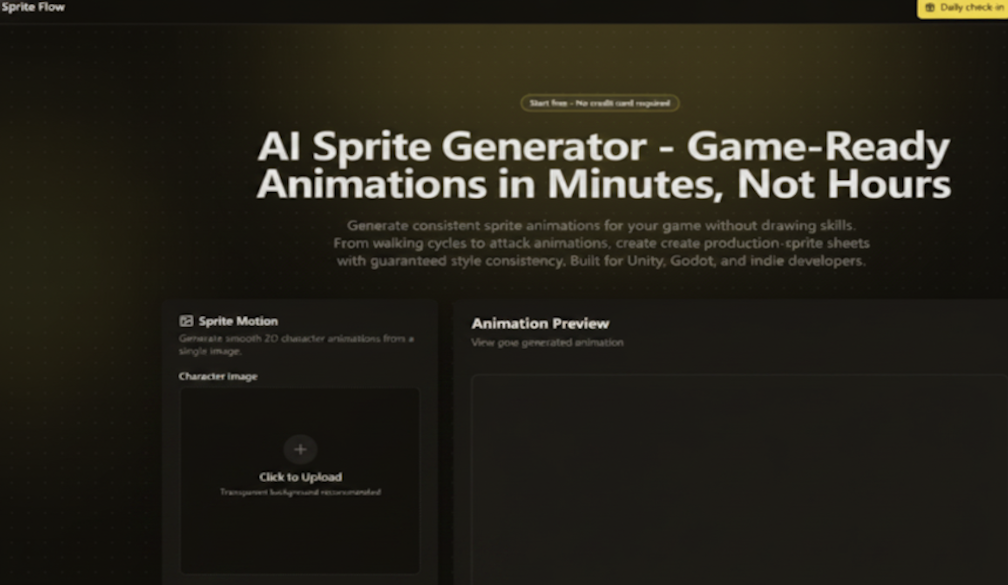
There’s a moment in every indie game project where you realize you’ve made a terrible mistake. You’ve designed a great character. You’ve written their dialogue. You’ve built their abilities. And then you remember: you need to animate them. Walking. Running. Attacking. Idling. Dying. Jumping. Eight frames for the walk cycle. Six for the idle. Twelve for the attack. And if you’re building an isometric game, multiply everything by eight directions. That’s when I discovered an AI Sprite Generator that promised to break the cycle.
That’s when the math hits you. Twenty hours per character. A complete character sheet takes 20+ hours and costs $500 to $5,000. If you have 20 characters in your game, that’s 400 hours of animation work – ten full work weeks – before you’ve written a single line of gameplay code.
This is the bottleneck that kills more indie games than bad mechanics, poor marketing, or lack of funding combined. And it’s the reason I spent the last month testing a radically different approach to sprite animation.
Why Traditional Tools Fall Short
Aseprite is wonderful. I’ve used it for years. It’s the gold standard for pixel art, and I don’t say that lightly. But here’s the uncomfortable truth: Aseprite is a drawing tool, not a production tool. It’s designed for artists who have hours to spend on individual frames. It’s not designed for developers who need to generate 200 enemy sprites in a weekend.
The problem isn’t the software – it’s the workflow. Manual sprite creation is linear. You draw frame 1. Then frame 2. Then frame 3. Each frame takes 30 to 120 minutes. By the time you reach frame 8, your hand is tired, your eye is wandering, and the character looks slightly different than it did in frame 1. Colors shift. Line thickness varies. Proportions drift.
This isn’t a skill issue – it’s a human limitation. The artist who drew frame 1 and the artist who drew frame 30 are technically the same person, but practically, they’re in different headspaces. The result is inconsistency that haunts every manually animated sprite sheet.
A Production-First Workflow
The tool I tested approaches sprite creation as a production problem, not an art problem. The workflow is designed for throughput, not perfectionism.
Step One: Lock the Style
Upload or Describe – Then Commit to a Visual Identity
You start by uploading a character image or describing your character’s appearance. You choose your art style – pixel art (8-bit, 16-bit, 32-bit), 2D cartoon, anime, or you train the AI on your own reference images. The system locks your color palette, line thickness, detail level, and proportions. From that point forward, every frame and every character will share these parameters.
This is the critical difference from other AI art tools. Most generators treat each prompt as an independent creation. This tool treats your style as a persistent constraint that applies to everything you generate.
Step Two: Generate the Animation
Select Your Animation Type and Frame Count
You select your animation type – idle, walk, run, jump, attack, hit reaction, death, crouch, roll, climb, swim, or victory. You set the frame count (typically 6 to 12 frames) and speed. You click generate. The AI produces all frames with perfect style consistency in under 60 seconds.
Step Three: Export to Your Engine
One-Click Unity, Godot, and Unreal Integration
This is where the production workflow really shines. You’re not downloading a PNG and figuring out the rest. One-click export to Unity, Godot, or Unreal includes the sprite sheet atlas, JSON metadata with frame positions and durations, animation controller presets, and collision box suggestions. No manual setup. No guesswork. This AI Sprite Generator is built for developers who actually ship games, not for artists who want to tweak pixels all day.
The Integration Advantage
For developers using Unity or Godot, the export integration is particularly valuable. I tested the Unity export and received a sprite sheet atlas, JSON with frame data, an animation controller preset, and collision box suggestions. The animation controller was already configured with the correct frame timings. I dropped it into my project and the character was walking in under two minutes.
This isn’t just about saving time on animation – it’s about eliminating the friction between art generation and gameplay implementation. In traditional workflows, you generate the sprites, then you spend hours setting up animation controllers, configuring frame timings, and tweaking collision boxes. That setup work is invisible but time-consuming. The one-click export eliminates it entirely.
8-Directional Generation for Isometric Games
The 8-directional support is worth calling out separately. For top-down and isometric games, generating sprites for all eight viewing angles is a monumental task. Manual artists draw each angle separately – that’s eight times the work for every animation state.
This tool generates all 8 angles automatically from a single character base. In my testing, I generated a complete isometric character with idle, walk, and attack animations across all 8 directions in about 15 minutes. Traditional approach: at least 160 hours of manual work.
Character Variations Without the Overhead
Another production bottleneck is character variation. Need different outfits, hair colors, or equipment tiers? Traditional approach: redraw every animation frame for every variation – another 20+ hours per variation.
This tool lets you change the color palette or equipment in the style settings and regenerate in three minutes. Every variation maintains perfect style matching across hundreds of sprites. For idle games, match-3 games, and any genre that requires multiple character tiers or skins, this is transformative.
Real Production Data
Let me share what this looks like in actual production numbers. A platformer developer generated walking, running, jumping, and attacking animations for their side-scroller hero in a single 30-minute session. An indie studio founder reported that the tool lets their three-person team prototype game ideas 10x faster – test gameplay mechanics first, polish art later.
A retro game developer trained the AI on classic SNES sprite art and now generates authentic 90s-style sprites for their retro platformer. The color palette locking was essential for pixel art consistency – a feature that’s notoriously difficult to maintain across manual frames.
Where This Fits in Your Pipeline
The developers I’ve seen get the most value from this tool use it strategically. They don’t abandon manual tools entirely – they integrate AI generation into their existing pipeline.
One developer described their workflow clearly: “I use Aseprite for hero characters and this tool for everything else”. They generated 200+ enemy sprites in retro 16-bit style using the AI tool, saving months of work while keeping hero characters for manual polish.
This hybrid approach makes sense. AI excels at volume and consistency – the 90% of sprites that fill out a game world. Manual tools excel at bespoke, hero-level work that requires unique artistic expression. The two aren’t competitors – they’re complementary.
The Practical Limitations
A few honest notes about what this tool doesn’t do well. Complex animations with intricate poses may require multiple generations. The AI handles simple movements beautifully – idle, walk, run – but combat animations with specific weapon angles sometimes need a second attempt.
The quality of output depends on the quality of your reference images. Uploading inconsistent references produces inconsistent style extraction. The tool’s documentation acknowledges that results may vary, and that’s a fair assessment.
The tool is designed for 2D sprite animation. If you’re working in 3D or need highly stylized art directions, this isn’t the right tool. It’s for developers who need volume, consistency, and speed – not for pushing the boundaries of artistic expression.
Who This Is For
This tool is for developers who have hit the animation wall. It’s for solo indie developers who can’t afford $500-per-character art costs. It’s for RPG developers who need dozens of NPCs with consistent style. It’s for game jam participants who need custom art in days, not months. It’s for programmers who can build systems but can’t draw.
It’s not for professional studios with dedicated art teams and unlimited budgets. It’s not for artists who enjoy the craft of pixel-by-pixel drawing. It’s for everyone else – the vast majority of game developers who just need their characters to walk, attack, and look consistent.
The 20-hour animation cycle has been the bottleneck for too long. For developers who want to spend their time on gameplay instead of frame-by-frame drawing, that bottleneck is finally breaking.