How Motorised Standing Desks Improve Comfort and Productivity
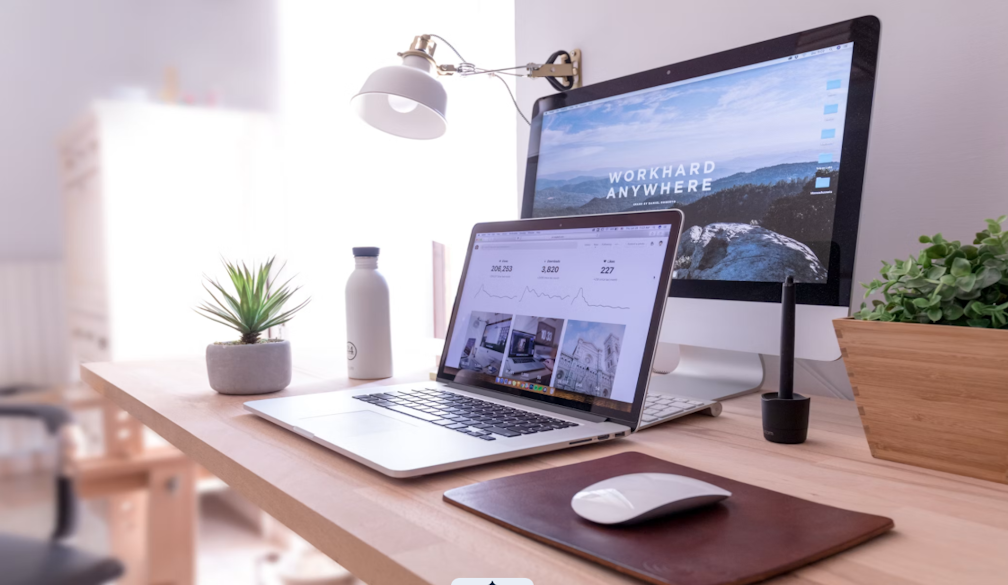
If you work from home in Australia, you may know the pattern. You sit down at 9 am, open your emails, and the next time you look up it is 2 pm. Your lower back feels stiff, your shoulders creep towards your ears, and the mid-afternoon slump arrives. Many Australians now work, study, or freelance from spare bedrooms, kitchen tables, and compact apartments. A few practical changes to how you sit, stand, and organise your desk can make the day feel easier.
Why easy height changes help you feel better at your desk
The main benefit of an adjustable setup is not standing for hours. It is making posture changes simple enough that you use them during a normal workday.
Small movements add up
You do not need to overhaul your routine. Shifting between sitting and standing a few times a day can help reduce the stiffness that comes from holding one position for hours. Think of it like stretching during a long drive. The movement is small, but it breaks up the tension that builds when your body stays still for too long.
Less fiddling, more switching
If adjusting your desk height means cranking a handle or wrestling with a lever, you are less likely to bother. When the change happens at the press of a button, you are more likely to use it. Convenience removes the mental barrier. You tap a preset, the desk moves, and carry on with your work. The easier it is to switch to standing, the more likely you are to use both heights during the week.
Standing is not a cure-all
Standing all day is not automatically better than sitting all day. What can help is alternating between the two and paying attention to how your body feels. If your feet start aching, sit down. If your back feels tight after an hour in the chair, stand up. The point is to give yourself options.
What a motorised desk does
An electric height-adjustable desk raises and lowers the desktop with a powered frame. The value is in how quickly you can move between the heights you use most.
Height range and presets
Most models let you save two or more height positions as presets, so you can move between your preferred sitting height and standing height without guessing each time.
Motion, noise, and stability
When the desk moves, you will usually hear a low hum. In many homes it is quiet enough to use during a video call without drawing attention. The desktop should stay steady while it moves, with minimal wobble at standing height. If noise or stability is a concern, compare frame design carefully.
Power and cables
The desk plugs into a standard wall outlet. In a rental, position the desk near an existing power point and use adhesive cable clips to route cords along the desk leg and skirting board. A clip-on cable tray can also keep things tidy without making permanent changes to the room.
Set-up basics for Australian homes and rentals
Pick the spot
Look for a location with natural light that does not create glare on your screen. A spot near a window but slightly to the side usually works well. Make sure the desk will not block walkways once raised, and leave enough room behind your chair to push it back comfortably. These practical choices are the modern desk features that matter most in a small home office.
Monitor, keyboard, and chair
Keep it simple. Your screen should sit roughly at eye level so you are not tilting your head up or down. Your elbows should rest at about a right angle when typing, and your wrists should stay fairly straight. If you use a laptop, a small stand and separate keyboard can make a big difference.
Comfort add-ons
A standing mat can take pressure off your feet when you are upright. A small footrest gives you something to shift your weight onto while sitting. Adhesive cable clips, a cable tray, and a phone timer can also help you keep the habit going.
A simple daily rhythm you can stick to
Rather than chasing a strict schedule, tie your sit-stand transitions to things you already do. Stand when you join a video call. Sit when you start a deep-focus writing session. Switch again when the kettle boils. The idea is to let natural break points prompt the change, so it feels easy instead of forced. Over a few weeks, you will likely find a rhythm without thinking about it much.
How to choose the right desk for you
Specs are useful only when they match your room and habits. Focus first on fit, safety, controls, and support.
Size and room fit
Desktops generally come in a few standard widths. For a compact study nook or shared room, a top around 120 cm wide can fit a monitor, keyboard, and notepad without taking over the space. Before you buy, measure the area with your chair tucked in and make sure there is still a clear walkway.
Lifting capacity and safety
Check the lifting capacity against the gear you use every day, such as monitor arms, speakers, a desktop computer, or heavy accessories. Some desks also include anti-collision sensors that stop the motor if the desktop bumps into something on the way up or down. A child-lock feature can help if you share your space with kids or pets.
Controller types and extras
Basic controllers offer up and down buttons. More advanced ones add memory presets, a small height display, and sometimes a USB charging port built into the frame. A cable tray and lockable castors can be useful in rentals where you may want to roll the desk aside.
Warranty and support basics
Look for a warranty that covers the frame and motor clearly. Check whether replacement parts are available in Australia and whether support is reachable by phone or email.
If you are comparing electric and manual options in Australia, a motorised standing desk category page can help you check common sizes, finishes, frames, and accessories before you decide.
Everyday mini-scenarios
Here are a few ways the same features can work in different homes.
Renter in a studio. Jess works from a one-bedroom flat in Melbourne. Her desk sits near the window, with cables routed along the skirting board using adhesive clips. She uses preset buttons to switch positions between meetings.
Parent sharing a living area. Tom and his partner both work from home in Brisbane. The child-lock feature means their toddler cannot accidentally move the desk. Tom stands during morning calls and sits for afternoon admin.
Gamer and worker combo. Sam studies and games from the same desk in a Sydney share house. Sitting low works for gaming, while standing height suits daytime lectures and assignments.
Conclusion
You do not need a perfect workspace to feel more comfortable and focused during the day. Small, repeatable adjustments, such as switching between sitting and standing, tidying your cables, and positioning your screen at the right height, can change how the afternoon feels. Start with one or two tweaks this week, then build from there.
FAQs
These quick answers cover common questions about noise, rental setup, position changes, and useful accessories.
Are electric sit-stand desks noisy in a quiet home?
Most modern electric desks produce a low hum during adjustment, roughly similar to a quiet kitchen appliance. If noise is a concern, compare frame design and motor type before you buy.
Can renters set one up without drilling into walls?
Yes. The desk itself is freestanding, so no wall mounting is needed. Use adhesive cable clips and a clip-on cable tray to manage cords without making holes.
How often should I change positions?
There is no single right answer. A good starting point is to listen to your body and switch when you feel stiff or restless.
What accessories make switching easier?
A standing mat, clip-on cable tray, and saved height presets are the most practical additions. A small footrest and phone timer can also help.