

Is an NVR Security System the Right Choice for Your Property?
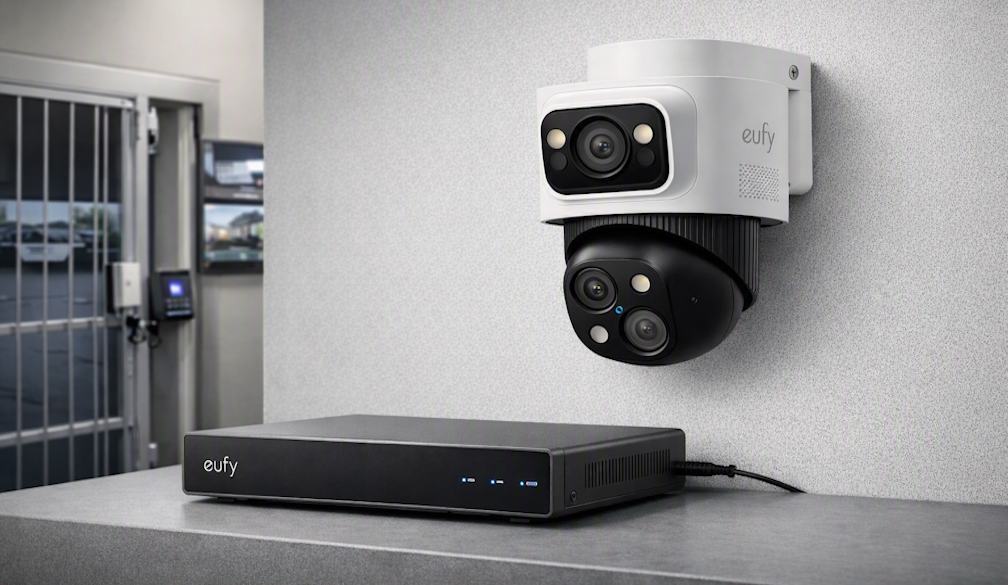
Most people start their home security journey with a single camera. Then they add another for the backyard. Then a third for the garage. At some point, managing individual cameras through separate app dashboards, juggling different storage setups, and losing track of which device needs its battery charged becomes more frustrating than the original problem it was solving. This is the moment when a coordinated NVR security system starts to make real sense.
An NVR — network video recorder — is a central hub that connects multiple cameras into a single, unified system. All footage flows to one place, all cameras appear in one interface, and adding a new camera to the network is a matter of a few steps rather than a new app installation. For properties with complex layouts, multiple entry points, or a genuine need for continuous recording rather than event-triggered clips, an NVR system provides a level of coverage and reliability that individual smart cameras aren't designed to match. This guide explains how NVR systems work, how to plan one for your property, and what to look for when comparing options.
How NVR Systems Differ from Standard Security Cameras
Standard smart cameras are self-contained units: each one connects independently to your Wi-Fi network, processes video on its own hardware, and stores footage either locally on a microSD card or in a cloud account tied to that specific device. This setup works well for one or two cameras but creates friction at scale. Reviewing footage from a specific date requires opening the app for each camera separately, storage limits vary by device, and if one camera loses its Wi-Fi connection, you may not notice until you need the footage and find a gap.
An NVR system centralises these functions. The recorder connects to your router and communicates with a set of compatible cameras over your network. All video is processed by the NVR's hardware and stored on an internal hard drive — typically in the range of one to four terabytes, enough for continuous recording across multiple cameras spanning days or weeks. A single app or monitor interface shows every camera simultaneously, and searching for a specific clip means navigating one unified timeline rather than checking each camera individually.
PoE vs Wireless NVR Cameras
NVR systems use two types of camera connections: Power over Ethernet (PoE) and wireless. PoE cameras receive both power and data through a single Ethernet cable run from the NVR or a PoE switch. This eliminates batteries and Wi-Fi dependency entirely — a PoE camera at the far end of the backyard maintains a stable, full-bandwidth connection as long as the cable is intact. The limitation is the cable run itself: installation requires routing cables through walls, ceilings, or conduit, which involves more effort and typically a one-time installation cost.
Wireless NVR systems communicate with cameras over Wi-Fi or a dedicated encrypted wireless frequency, preserving the flexible placement of wireless cameras while still aggregating footage to a central recorder. They're easier to install and better suited to properties where running cable is impractical. The tradeoff compared to wired PoE is a slightly higher sensitivity to signal interference and the continued need to manage battery life on wireless cameras, though many modern wireless NVR cameras support continuous power from an outdoor outlet.
Planning Camera Placement for Whole-Property Coverage
The advantage of planning an NVR system from the start — rather than accumulating cameras incrementally — is the ability to design coverage that eliminates blind spots deliberately. Begin by sketching your property layout and marking every entry point: front door, back door, garage, side gates, fences with accessible climbing points. These are your highest-priority locations. Then consider secondary monitoring needs: a long driveway that warrants a camera at the end as well as near the house, a pool area, a shed with valuable equipment, or a parking space on the street.
Assign a camera type to each location based on the specific monitoring need. A wide-angle camera is appropriate for open areas like the backyard or driveway, while a camera with a longer focal length is better for monitoring a specific gate or corridor at distance. Indoor cameras placed at hallway intersections or stairwells document movement through the home's interior, which adds investigative value if an exterior camera's footage is limited. Plan for the NVR's maximum channel count when deciding how many cameras to install — most consumer NVR systems support between four and sixteen channels, and leaving capacity for future additions avoids needing to replace the recorder if you want to expand.
Storage Capacity and Continuous Recording
One of the most significant advantages of an NVR over individual smart cameras is the ability to record continuously rather than only when motion is detected. Event-triggered recording saves storage space and makes reviewing specific incidents easier, but it creates gaps — if a camera's motion detection misses the beginning of an event, or if a slow, deliberate movement doesn't trigger the sensor, the recording starts late. Continuous recording captures everything, which is particularly valuable in commercial or high-risk residential applications where any gap in footage is unacceptable.
Storage duration depends on the number of cameras, the resolution they record at, and whether recording is continuous or event-triggered. A rough estimate for planning purposes: four cameras recording continuously at 1080p fill approximately one terabyte every five to seven days. At 4K resolution, storage is consumed roughly four times faster. NVR hard drives overwrite the oldest footage when full, so the effective recording window is determined by hard drive size relative to total data throughput. Most NVR systems display the estimated recording window in the settings interface, making it easy to verify whether your storage capacity matches your retention requirements.
Remote Access, Smart Features, and Integration
Modern NVR systems are not closed, standalone systems — they connect to your home network and expose their functionality through smartphone apps that provide access from anywhere. Checking live feeds while travelling, reviewing footage after an alert, or downloading a clip to share with authorities are all standard functions in current-generation systems. Look for an app interface that handles multi-camera grids clearly and makes timeline scrubbing intuitive, as these are the tasks you'll perform most frequently.
AI-powered detection at the NVR level allows the system to analyse footage from all connected cameras and generate intelligent alerts: person detection, vehicle detection, or unusual activity outside normal patterns. Rather than receiving an alert from each camera independently, the NVR correlates events across the system — a person detected at the side gate can trigger awareness on the nearest driveway camera simultaneously. This coordinated intelligence is one of the genuine advantages of a unified NVR system over a collection of individual devices. Brands like eufy design their NVR systems to surface these insights through a clean app experience that's accessible without technical expertise.
Integration with existing smart home ecosystems — voice assistants, smart displays, automation platforms — extends the NVR's usefulness beyond pure security monitoring. Pulling up a live camera feed on a smart display with a voice command, triggering lighting when the NVR detects a person at the front gate, or routing NVR alerts through your existing smart home notification system creates a more cohesive experience. Check compatibility with your current platform before purchasing, as integration depth varies across brands and ecosystems.
Installation Considerations and Long-Term Maintenance
For PoE systems, the physical installation is the most demanding part of the setup process. Planning cable routes before purchasing the system helps avoid discovering mid-installation that a particular path requires more effort than expected. Ethernet cable runs through wall cavities typically need to pass fire-rated barriers and avoid running parallel to mains electrical cables for extended distances. For anything beyond a straightforward surface-mounted run, a licensed electrician or security installer is worth engaging for the cable work, even if you handle the NVR and camera configuration yourself.
Ongoing maintenance for an NVR system is minimal compared to managing individual smart cameras. Firmware updates for both the NVR and cameras are typically delivered through the app and applied in a few minutes. Hard drive health monitoring is a standard NVR feature — the system alerts you if the drive shows signs of failure well before it becomes critical, giving you time to replace it without losing footage. Cleaning camera lenses periodically and checking that mounts remain secure after seasonal weather changes are the main physical maintenance tasks.
When Unified Coverage Makes the Difference
An NVR security system is the right investment when your property genuinely requires coordinated, multi-camera coverage — not as an aspirational upgrade, but as a practical solution to real coverage gaps. The combination of centralised storage, unified management, continuous recording capability, and system-wide AI intelligence addresses problems that a collection of individual cameras cannot. Plan your camera placement deliberately, choose a storage capacity that matches your recording needs, and prioritise systems with strong remote access and smart detection. A well-designed NVR setup provides the kind of comprehensive coverage that gives you confidence in your property's security, rather than leaving you wondering what the cameras might have missed.