
How Can You Create a Spa-Inspired Bathroom Using Natural Materials and Textures?
- Written by: Times Media
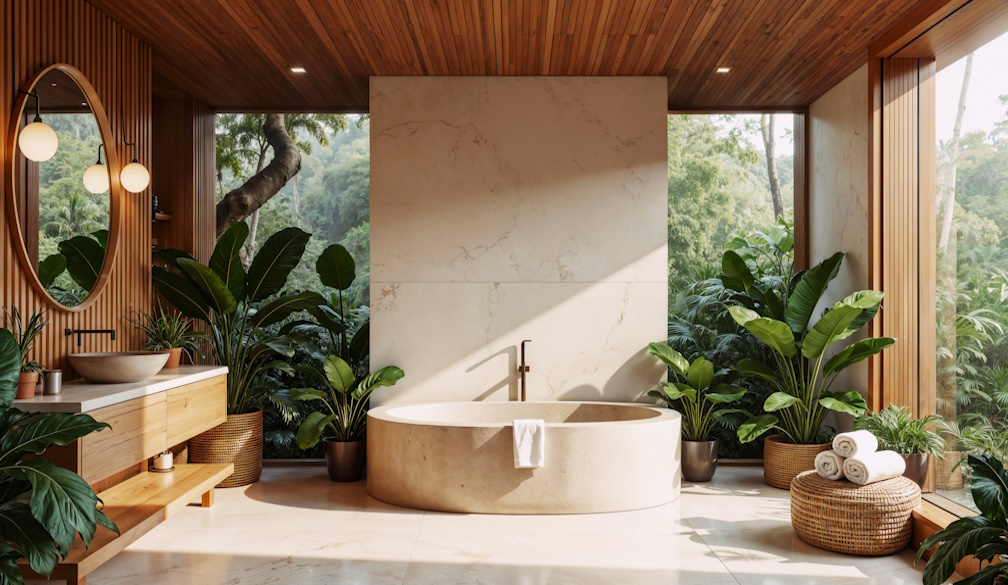
A spa-inspired bathroom is designed to create a calm, comfortable environment where everyday routines feel more relaxing. Rather than relying entirely on decorative features, this style focuses on natural materials, soft colours, balanced lighting and textures that bring warmth and character into the space.
Natural stone, timber finishes, textured tiles and organic design elements can help create a connection with nature while maintaining the practicality required in a bathroom. However, choosing the right combination involves considering moisture resistance, maintenance, durability and the available space.
Whether updating an existing bathroom or planning a completely new design, the following ideas can help homeowners create a spa-inspired space that balances visual appeal with everyday functionality.
1. Choose a Natural and Relaxing Colour Palette
Colour plays an important role in establishing the atmosphere of a spa-inspired bathroom. Soft, earthy shades can create a sense of warmth and relaxation without making the space feel visually overwhelming.
Consider colours such as:
- Warm whites and soft creams.
- Beige, sand and taupe.
- Muted greens inspired by nature.
- Soft grey and natural stone shades.
- Warm brown tones that complement timber finishes.
These colours can be introduced through wall tiles, flooring, cabinetry, benchtops and decorative accessories. Using a consistent palette across different surfaces helps create a cohesive appearance.
Homeowners should also consider how natural and artificial lighting will affect the selected colours. Testing material samples in the actual bathroom can help avoid unexpected differences in appearance.
2. Incorporate Natural Stone for Texture and Character
Natural stone can introduce distinctive patterns, subtle colour variations and organic textures into a bathroom. Materials such as marble, travertine, limestone and granite are commonly considered for benchtops, feature walls and selected flooring applications.
Each stone has different characteristics, so suitability should be assessed according to its intended use.
For example, some natural stones are more porous and may require sealing to help protect them from moisture and staining. Others may need specific cleaning products to maintain their appearance.
Before selecting natural stone, homeowners should consider:
- Its suitability for wet-area applications.
- Slip resistance when used for flooring.
- Sealing and ongoing maintenance requirements.
- Resistance to staining and everyday bathroom products.
- Compatibility with other finishes.
Stone does not need to cover every surface to create an impact. A feature vanity benchtop, shower wall or carefully selected accent can introduce natural character without making the bathroom feel overly busy.
3. Use Timber Finishes to Add Warmth
Timber can soften the appearance of bathrooms that feature extensive stone, porcelain or ceramic surfaces. Its natural grain and warm tones help create a more inviting environment.
Timber-inspired finishes can be introduced through:
- Vanity cabinetry.
- Floating shelves.
- Storage niches with suitable finishes.
- Decorative accessories.
- Timber-look porcelain tiles.
However, real timber and timber-based products must be selected carefully for bathroom conditions. Direct and prolonged moisture exposure can cause swelling, deterioration or other material damage if the product is unsuitable.
Homeowners should discuss moisture-resistant cabinetry, appropriate protective finishes and suitable installation methods before making a selection.
Timber-look porcelain tiles can also provide a natural appearance while offering a practical surface for areas exposed to regular moisture.
4. Introduce Textured Tiles for Visual Interest
Texture can make a significant difference to the overall appearance of a spa-inspired bathroom. Instead of relying on multiple colours or decorative patterns, homeowners can combine different surface finishes to create depth.
Popular options include:
- Stone-look porcelain tiles.
- Matte-finish wall tiles.
- Subtle textured feature tiles.
- Fluted or ribbed surfaces.
- Natural-look mosaic tiles.
A combination of smooth and textured surfaces can help distinguish different areas without disrupting the overall design.
For example, larger neutral tiles may work well across the main floor and walls, while a textured finish can add interest to the shower area or vanity backdrop.
When choosing textured flooring, homeowners should also consider slip resistance, cleaning requirements and suitability for wet areas.
5. Create a Spacious Feel with a Walk-In Shower
A walk-in shower can contribute to the open and uncluttered appearance commonly associated with spa-inspired bathrooms.
Frameless or minimally framed glass screens allow more light to travel through the room and can make smaller bathrooms feel less enclosed. A simple shower layout also creates opportunities to incorporate natural stone finishes, recessed niches and understated fittings.
Important design considerations include:
- Suitable shower dimensions and access.
- Effective floor drainage and falls.
- Appropriate waterproofing details.
- Glass screen placement.
- Storage for everyday shower products.
- Safe and practical flooring materials.
The shower should be designed around the available space and household requirements. A visually open layout must still provide adequate water containment, comfortable access and effective drainage.
6. Select Fixtures with Simple, Organic Designs
Bathroom fixtures can complement natural materials without becoming the main visual focus. Clean shapes, understated profiles and coordinated finishes help maintain a calm and balanced appearance.
Consider fixtures such as:
- Rounded or oval countertop basins.
- Minimalist wall-mounted tapware.
- Simple freestanding bathtubs.
- Brushed metal shower fittings.
- Streamlined towel rails and accessories.
Finishes such as brushed nickel, brushed brass, chrome and matte black can work with natural stone and timber-inspired surfaces. The choice should reflect the overall colour palette and the level of maintenance homeowners are comfortable with.
It is also worth considering water efficiency, product quality and ease of cleaning when selecting bathroom fixtures.
7. Use Layered Lighting to Create a Relaxing Atmosphere
Lighting is essential for creating a comfortable bathroom environment. A single overhead light may provide general visibility, but a more considered lighting plan can make the room feel warmer and more inviting.
A layered approach can include:
Ambient lighting: General illumination that provides consistent light throughout the bathroom.
Task lighting: Focused lighting around mirrors and vanities to support grooming and everyday activities.
Accent lighting: Subtle illumination around niches, shelving or architectural features to highlight textures and finishes.
Warm-toned lighting can complement earthy colours and natural materials. However, sufficient brightness should be maintained around mirrors and other functional areas.
All bathroom lighting must also be suitable for its installation location and comply with relevant electrical safety requirements.
8. Add Greenery and Natural Decorative Elements
Plants and natural accessories can strengthen the connection between a bathroom and its surroundings. Even a few carefully selected elements can soften hard surfaces and introduce visual variety.
Suitable additions may include:
- Moisture-tolerant indoor plants.
- Wooden trays and accessories.
- Stone soap dishes.
- Natural-fibre storage baskets.
- Neutral towels and bath mats.
- Simple ceramic decorative pieces.
Plant selection should account for available natural light, humidity and ventilation. Bathrooms with limited daylight may be better suited to low-light plants or realistic decorative alternatives.
The goal is to introduce natural details without overcrowding the available space or creating unnecessary maintenance.
9. Plan Storage to Maintain an Uncluttered Appearance
A spa-inspired bathroom should feel organised as well as visually appealing. Visible toiletries, cleaning products and everyday accessories can make even a beautifully designed space feel crowded.
Practical storage solutions help keep frequently used items accessible while maintaining clean surfaces.
Consider incorporating:
- Floating vanities with integrated drawers.
- Mirrored storage cabinets.
- Recessed shower niches.
- Built-in shelving.
- Tall cupboards where space allows.
- Dedicated storage for towels and cleaning products.
Storage should be considered early in the design process so that cabinetry, plumbing and wall arrangements can accommodate the intended features.
Homeowners planning broader property improvements may also benefit from applying similar space-planning principles to small kitchen renovations Perth, where practical storage and efficient layouts are equally important.
10. Balance Natural Materials with Long-Term Practicality
Natural materials can create a distinctive bathroom design, but their maintenance and performance should be considered before final selections are made.
A material that looks attractive in a showroom may require additional care when exposed to daily moisture, cleaning products and temperature changes.
Before finalising the design, consider:
- Whether the material is suitable for its intended application.
- How frequently it requires cleaning or sealing.
- Whether replacement products will be readily available.
- How different surfaces will age over time.
- Whether the selected finishes complement one another.
- Whether the bathroom remains practical for all household members.
For homeowners considering luxury bathroom renovations Perth, the best results come from combining carefully selected finishes with thoughtful planning, quality installation and practical design decisions.
Conclusion
Creating a spa-inspired bathroom involves more than selecting attractive tiles and decorative accessories. Natural stone, timber finishes, textured surfaces, layered lighting and carefully chosen fixtures can work together to establish a calm and inviting environment.
However, the most successful designs also account for moisture resistance, storage, ventilation, cleaning requirements and long-term durability. By balancing natural aesthetics with practical considerations, homeowners can create a bathroom that feels relaxing while remaining suitable for everyday use.