What does it mean to ‘accept’ or ‘reject’ all cookies, and which should I choose?
- Written by: Ahmed Ibrahim, Senior Lecturer, Computing and Security, Edith Cowan University

It’s nearly impossible to use the internet without being asked about cookies. A typical pop-up will offer to either “accept all” or “reject all”. Sometimes, there may be a third option, or a link to further tweak your preferences.
These pop-ups and banners are distracting, and your first reaction is likely to get them out of the way as soon as possible – perhaps by hitting that “accept all” button.
But what are cookies, exactly? Why are we constantly asked about them, and what happens when we accept or reject them? As you will see, each choice comes with implications for your online privacy.
What are cookies?
Cookies are small files[1] that web pages save to your device. They contain info meant to enhance the user experience, especially for frequently visited websites.
This can include remembering your login information and preferred news categories or text size. Or they can help shopping sites suggest items based on your browsing history. Advertisers can track your browsing behaviour through cookies to show targeted ads.
There are many types, but one way to categorise cookies is based on how long they stick around.
Session cookies are only created temporarily – to track items in your shopping cart, for example. Once a browser session is inactive for a period of time or closed, these cookies are automatically deleted.
Persistent cookies are stored for longer periods and can identify you – saving your login details so you can quickly access your email, for example. They have an expiry date ranging from days to years.
What do the various cookie options mean?
Pop-ups will usually inform you the website uses “essential cookies” necessary for it to function. You can’t opt out of these – and you wouldn’t want to. Otherwise, things like online shopping carts simply wouldn’t work.
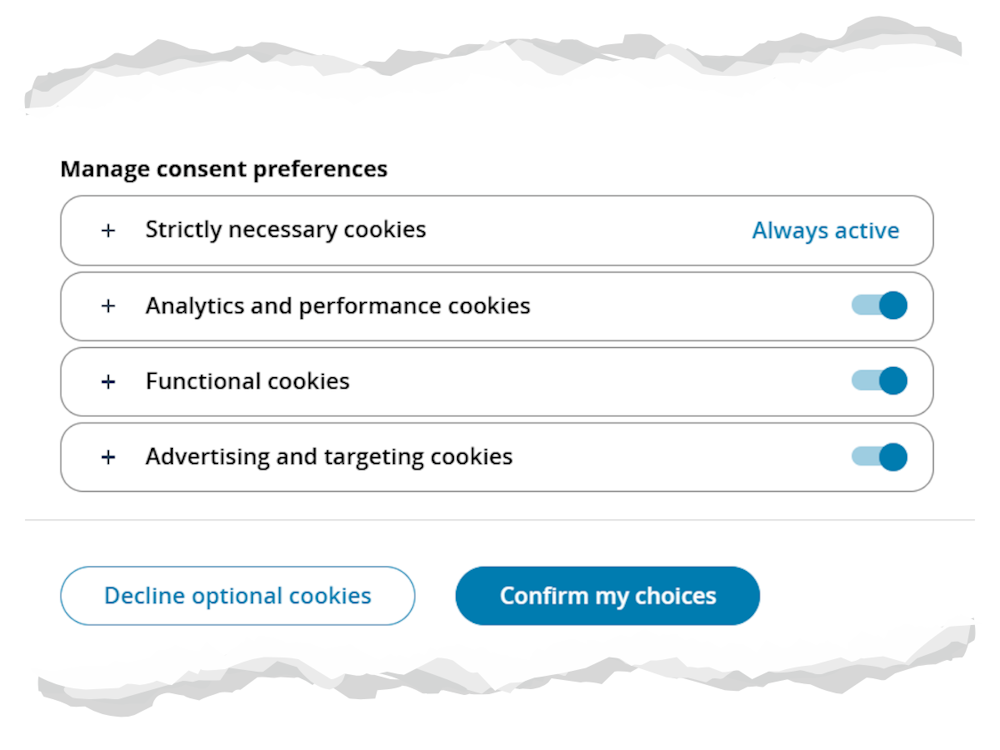
However, somewhere in the settings you will be given the choice to opt out of “non-essential cookies”. There are three types of these:
-
functional cookies, related to personalising your browsing experience (such as language or region selection)
-
analytics cookies, which provide statistical information about how visitors use the website, and
-
advertising cookies, which track information to build a profile of you and help show targeted advertisements.
Advertising cookies are usually from third parties, which can then use them to track your browsing activities. A third party means the cookie can be accessed and shared across platforms and domains that are not the website you visited.
Google Ads, for example, can track your online behaviour not only across multiple websites, but also multiple devices. This is because you may use Google services such as Google Search or YouTube logged in with your Google account on these devices.
Should I accept or reject cookies?
Ultimately, the choice is up to you.
When you choose “accept all,” you consent to the website using and storing all types of cookies and trackers.
This provides a richer experience: all features of the website will be enabled, including ones awaiting your consent. For example, any ad slots on the website may be populated with personalised ads based on a profile the third-party cookies have been building of you.
By contrast, choosing “reject all” or ignoring the banner will decline all cookies except those essential for website functionality. You won’t lose access to basic features, but personalised features and third-party content will be missing.
The choice is recorded in a consent cookie, and you may be reminded in six to 12 months.
Also, you can change your mind at any time, and update your preferences in “cookie settings”, usually located at the footer of the website. Some sites may refer to it as the cookie policy or embed these options in their privacy policy.

How cookies relate to your privacy
The reason cookie consent pop-ups are seemingly everywhere is thanks to a European Union privacy law that came into effect in 2018. Known as GDPR (General Data Protection Regulation[3]), it provides strict regulations for how people’s personal data is handled online.
These guidelines say that when cookies are used to identify users, they qualify as personal data and are therefore subject to the regulations[4]. In practice, this means:
- users must consent to cookies except the essential ones
- users must be provided clear info about what data the cookie tracks
- the consent must be stored and documented
- users should still be able to use the service even if they don’t want to consent to certain cookies, and
- users should be able to withdraw their consent easily.
Since a lot of website traffic is international, many sites even outside the EU choose to follow GDPR guidelines to avoid running afoul of this privacy law.
Better privacy controls
Cookie pop-ups are tiresome, leading to “consent fatigue[5]” – you just accept everything without considering the implications.
This defeats the purpose of informed consent.
There is another way to address your online privacy more robustly – Global Privacy Control (GPC[6]). It’s a tech specification developed by a broad alliance of stakeholders (from web developers to civil rights organisations) that allows the browser to signal privacy preferences to websites, rather than requiring explicit choices on every site.
GPC is not universally available, and it’s not a legal requirement – a number of browsers and plugins support it[7], but broader adoption may still take time.
Meanwhile, if you’re worried you may have accidentally consented to cookies you don’t want, you can find an option in your browser settings[8] to delete cookies and get back to a clean slate (be warned, this will log you out of everywhere). If you want to learn even more, the non-profit Electronic Frontier Foundation has a project called Cover Your Tracks[9].
References
- ^ small files (www.aboutcookies.org)
- ^ Tada Images/Shutterstock (www.shutterstock.com)
- ^ General Data Protection Regulation (theconversation.com)
- ^ to the regulations (gdpr.eu)
- ^ consent fatigue (legiscope.com)
- ^ GPC (globalprivacycontrol.org)
- ^ number of browsers and plugins support it (globalprivacycontrol.org)
- ^ in your browser settings (its.uiowa.edu)
- ^ Cover Your Tracks (coveryourtracks.eff.org)